







AI marketing reporting uses AI to summarize performance data across paid channels, identify notable changes, check data quality and suggest follow-up investigations. Digital marketing teams and marketing agencies can use it to prioritize weekly reviews across Google Ads, Facebook Ads and X Ads. This guide shows how to create a reusable Funnel AI skill for that job, so you can spot changes that need investigation before you act on them or change ad spend.
Imagine this hypothetical example: Google Ads conversions doubled last week. Most of the increase came from one UK Google Ads account, with 37 conversions attributed to a single day. What should you check before calling that a performance improvement?
That is the kind of question a useful weekly review should surface. It should show what changed, identify where to look, flag possible tracking or data quality issues, and suggest what to investigate next, so you can turn platform-level changes in marketing performance into timely action instead of missed anomalies or bad budget decisions. Many marketing agencies deliver monthly reports to help prove ROI, but a weekly review catches problems like this sooner.
You can create a Funnel AI skill, much like a Claude skill, for this recurring task. Define the reporting setup, add data checks, write the skill's steps, test the answer against your data, and customize the analysis for each platform before saving the skill for reuse.
In this guide, we'll build a skill around one question:
"What changed last week on each paid advertising platform, and what should we investigate?"
We'll use a fashion retailer demo account to illustrate what a useful answer looks like.
Where AI fits in marketing performance analytics
What AI can do in a weekly review
AI in digital marketing can scan performance metrics, summarize what moved and flag unexpected changes in marketing performance. That reduces manual work when marketing data flows into reporting processes. Think of this skill as a first pass you can run every week: it compares two weeks across marketing channels, checks the data and proposes what to investigate.
It is not an executive summary report, which condenses headline performance into one page for stakeholders, and it does not replace dashboard templates, which show the numbers. The skill explains what changed and what to check, so the findings can inform your marketing strategy and focus your marketing efforts.
What AI needs to know
AI does not automatically know your business goals, your target audience, how you define a conversion or whether someone changed a tracking tag during the comparison period. But you can tell it. Put that business information in your workspace Instructions, so it applies to every chat, or in the skill's reporting setup, such as conversion definitions, goals, markets and known tracking changes. The less the AI has to guess, the more the review can fit your marketing strategy.
What this skill does not do
AI in marketing covers more than weekly reviews. It can identify audience segments from behavior, improve customer targeting and personalization, and use historical signals for predictive analytics. Some tools also flag underperforming ads or optimize budget allocation dynamically. This skill does none of that. It reviews two complete weeks, flags what changed and suggests what to check. Because one week is thin evidence, it leaves decisions about pausing ads or moving budget to you. It also stays separate from SEO reports, which track organic visibility and user behavior over time.
Is marketing analytics going to be replaced by AI?
AI already handles much of the routine work: comparing weeks, running data checks and flagging what to investigate, which is what this skill does. As AI becomes more capable, expect it to take on more of the analysis, including more of the investigation itself. How far that goes is still uncertain, but marketers who learn to give AI the right information and steps will be best placed to turn performance data into actionable insights and data driven decisions.
The practical question is how to give AI those steps consistently, week after week. In Funnel, you do it with a skill.
Give the skill one clear job
Funnel AI skills are step-by-step rules that guide Funnel AI to perform a specific task. Funnel AI uses a skill when it is relevant to your request, or you can run it directly: type / in chat, select the skill and send your request. Learn about skills in Funnel AI.
Skills and Instructions: what is the difference?
Funnel AI has two ways to guide the agent. Instructions are rules it follows in every chat, so they suit information that always applies, such as how your team defines a conversion. A skill teaches it how to do one specific task, and it is used only when the task matches. Each skill has a name, a description that says when to use it and steps that describe how to do the task.
For this skill, the job is to compare two complete weeks, identify the main changes on each advertising platform and suggest up to three investigations.
Keep the task focused. A weekly review can identify a change worth examining and feed your marketing strategy, but establishing its cause may require more history or additional information. This review covers paid results, so search engine optimization and organic traffic are out of scope.
Define your reporting setup
Effective marketing reports need clear goals and KPIs, so start with the performance metrics and outcomes you want to understand on each platform. In performance marketing, where advertisers pay for results and common KPIs include CPC and CPL, accurate outcome counts matter most, which is why the steps ask you to confirm definitions and sources first. Confirm the exact metric fields, included accounts, campaign identifiers, reporting timezone and currency, including how accounts that report in other currencies are converted. This setup helps the skill read your marketing data consistently and ask useful questions when something essential is missing. Clicks and impressions can turn into vanity metrics when disconnected from outcomes, so supporting metrics should stay secondary unless they tie directly to the review's business objectives.
Keep each platform's outcomes separate
In digital advertising, each platform counts outcomes in its own way. Keep Google Ads, Facebook Ads and X Ads outcomes separate. Conversion definitions and attribution settings may differ, and multiple channels may claim credit for the same purchase. Grouping Facebook and X under Paid Social does not make their outcomes interchangeable, even though both are social media platforms. Google Ads covers search engine marketing as well as other campaign types, so it works differently again. That is why the skill reviews one platform at a time.
Marketing channels also differ in the target audience they reach, so a blended number across paid channels can hide more than it shows.
Check which sources feed each metric
To keep those reviews separate, check which data sources contribute to each metric. In our demo workspace, the shared revenue field contained values from Facebook Ads and Google Analytics, the web analytics source for website traffic. Filtering by source ensured the Facebook Ads review used the revenue generated according to Facebook Ads' own reporting and excluded Google Analytics outcomes. The review should also state which source supplied each outcome, so you can verify it.
Within a platform, combine accounts only when their reporting definitions and scope are compatible.
Copy and customize the skill steps
In Funnel AI, a skill has three fields to fill in: a skill name, a description that says when the AI should use it, and the steps.
Skill name: Weekly paid marketing review by platform
Description (when to use it): Use when the user asks what changed last week on each paid advertising platform, or asks for a weekly paid marketing review.
Steps: Replace the bracketed fields with your workspace details, then test the steps in chat. The next section shows how to fill in the outcome sources, the part most worth getting right.
|
|
Example: filling in the outcome sources
Use exact workspace metric and dimension names, and include field IDs where available to remove ambiguity. Name the source that feeds each outcome. Your field names will differ. In the demo workspace, the outcome lines looked like this:
|
-
|
In the demo workspace, the Conversions field pulls from a different source for each platform: Google Ads Conversions for Google Ads and Purchases for Facebook Ads. That is why the review keeps it filtered to one platform at a time.
If you leave a definition as "confirm", the steps tell the skill to ask for it and to withhold conclusions that depend on it, such as CPA and ROAS, until you answer. Keep the steps about how to analyze the data separate from previous findings, so last week's answer doesn't bias this week's review.
What a useful review looks like
We tested these steps against a fashion retailer demo workspace containing synthetic data, comparing Oct. 19-25 with Oct. 12-18, 2026. This excerpt of the Google Ads review shows one finding:
|
Metric |
Oct. 12-18 |
Oct. 19-25 |
Change |
% change |
|
Spend in USD |
$52,266.80 |
$53,466.25 |
+$1,199.45 |
+2.3% |
|
Reported conversions |
34 |
70 |
+36 |
+105.9% |
|
UK account conversions |
11 |
44 |
+33 |
+300% |
Synthetic demo data, excerpt of the review. Monetary metrics are shown in USD using the workspace's currency settings.
Of the UK account's 44 reported conversions in the latest week, 37 were attributed to Oct. 23. Its other days that week recorded between zero and three, and its daily range the previous week was one to three, so the concentration stands out. The UK account also accounts for 33 of the 36 additional reported conversions.
That gives the marketer a focused starting point. The finding identifies where the reported increase occurred. Establishing whether it represents additional purchases or online sales requires validating the conversion definition and settings first, with revenue and conversion rate among the key metrics to review alongside the anomaly. Recent conversion totals can also change as delayed conversions arrive, so the review treats them as provisional. It helps to document once, in a field description or in your Instructions, which date each platform counts conversions on.
The same review a week later shows why this matters. Comparing Oct. 26-Nov. 1 with Oct. 19-25, reported Google Ads conversions fall 34%, from 70 to 46, mostly because the 37-conversion day sits in the earlier week. Without that day, the earlier week would show 33 conversions. A week-over-week drop can reflect a one-day spike in the earlier week as much as a real decline, so the steps ask the skill to inspect daily concentrations first. In that run, the 37 conversions were one each across 37 Search campaigns, which looks more like an import or tracking pattern than 37 separate customer decisions, so the review suggested checking them by conversion action.
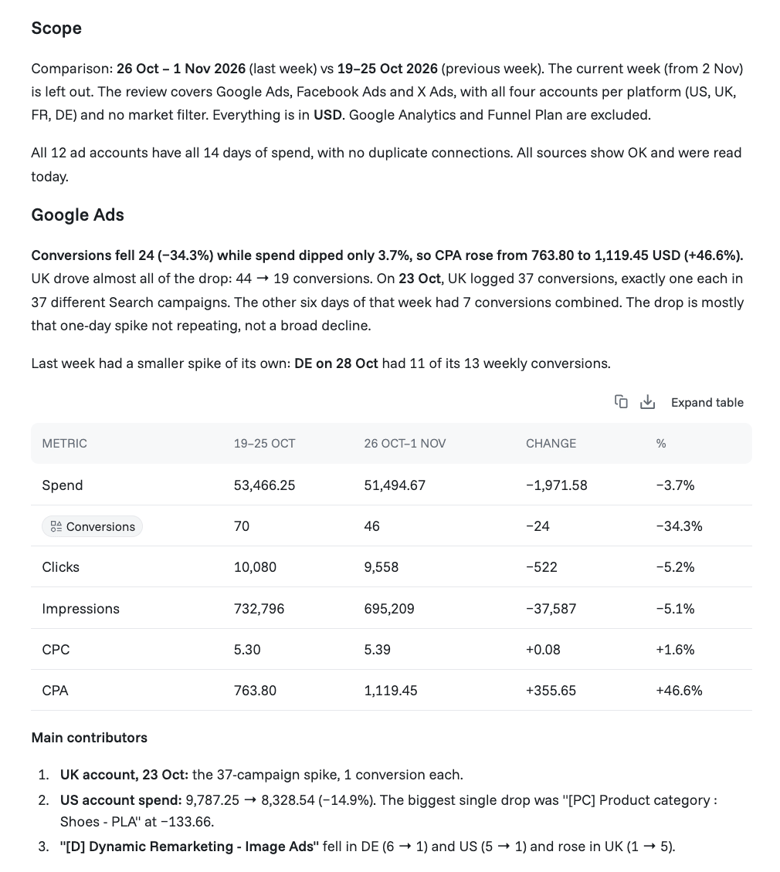
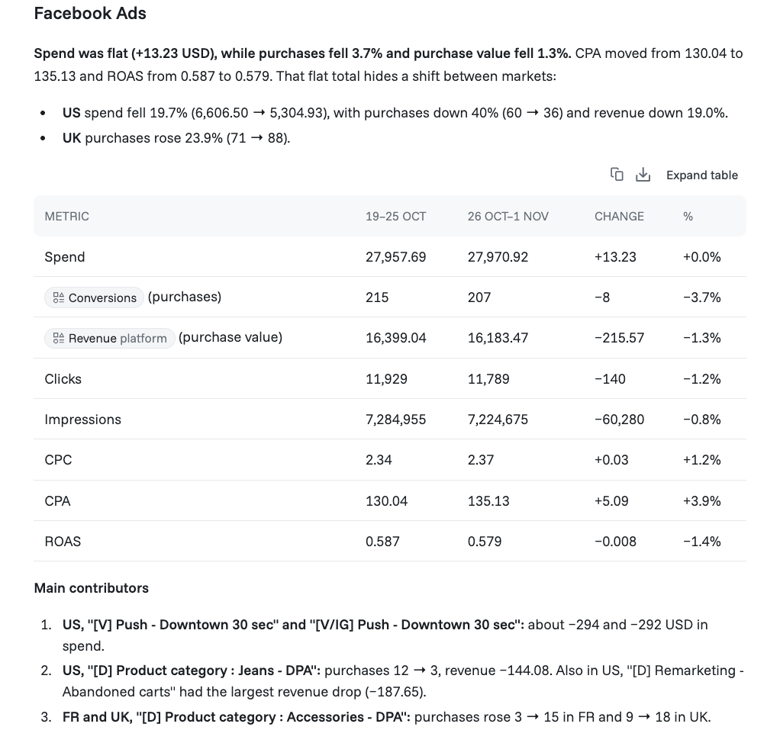
Oct. 26-Nov. 1 run in Funnel AI chat.
How the skill calculates week-over-week change
The skill compares each week with the one before it. Week-over-week change is this week's value minus last week's value, divided by last week's value. Conversions rising from 34 to 70 is a change of 36, or about 106%. When last week's value is zero, the percentage is shown as N/A. Ratios such as cost per click and cost per conversion are calculated from weekly totals, not by averaging campaign ratios.
What the review did with Facebook Ads and X Ads
Facebook Ads and X Ads each received a separate review, keeping their outcomes distinct from Google Ads. The workspace has no conversion data for X Ads, so the review assessed delivery only and did not report X Ads as having zero conversions, because missing data is not the same as zero. Campaign IDs were not available in the demo workspace, so the review identified campaigns by name plus account. That is reliable within one account but would merge campaigns that share a name and split one that was renamed, so use campaign IDs where you have them.
A prioritized follow-up
The review closed with up to three prioritized checks, each labeled by platform and tied to a finding, with data validation kept separate from performance investigation, so the report ends with next steps you can act on. In a fuller executive summary report, these checks would sit beneath the headline numbers. Two examples:
Google Ads, data validation: UK reported conversions rose from 11 to 44, with 37 attributed to Oct. 23. Confirm which conversion actions were included and whether tracking or conversion settings changed.
Google Ads, performance investigation: Once the metric is validated, identify which paid campaigns contributed to the increase.
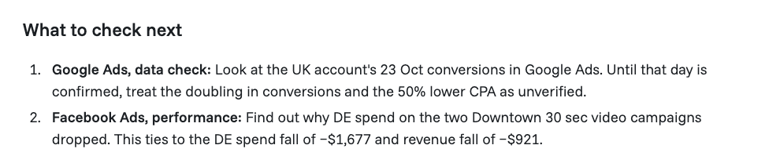
Oct. 19-25 run in Funnel AI chat.
Check the answer before saving the skill
Compare the review's dates, totals and definitions, including cost per conversion, with a report you trust. Then check three things.
Sources
Confirm that the review states which source supplied each outcome, and that it matches your field definitions, so a field's name is not mistaken for its origin.
Largest single day
Look at the biggest daily value behind any large weekly change, and compare it with the previous week.
Follow-ups
Check that each suggested investigation follows from a finding. The review points to what to check. Decisions about ad spend, budget allocation or marketing strategy need more than one week of results.
The review also lists the data checks it ran and any it could not run. Read that list before relying on its conclusions. Refine the steps if the answer uses the wrong metrics, misses useful detail or draws conclusions the data cannot support. Test any changes before sharing the skill with your team.
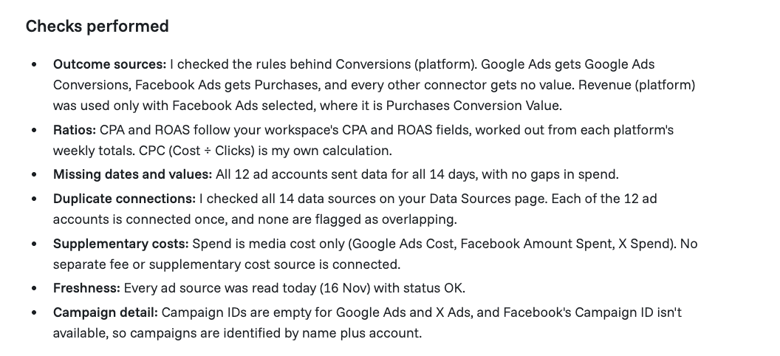
Oct. 19-25 run in Funnel AI chat.
Save the skill for reuse
Once the review produces a useful, checked result:
- Select AI in the left navigation, then Skills under AI Context.
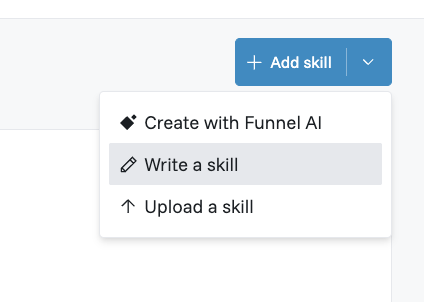
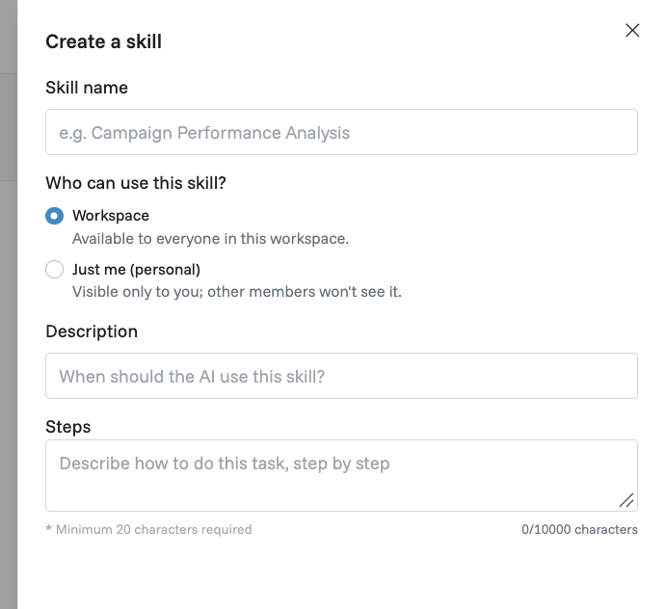
- Select Add skill, then Write a skill. The dialog is titled "Create a skill".
- Enter the skill name.
- Choose who can use it: everyone in the workspace, or just you.
- In Description, say when the AI should use the skill.
- In Steps, paste the tested steps. Steps can be up to 10,000 characters.
- Save the skill.
The Add skill menu also lets you create a skill with Funnel AI or upload one. You can also ask Funnel AI in chat to save a task as a skill, and approve it on the Save skill card. You need workspace edit permission to create a workspace skill. To run a saved skill in chat, type /, select the skill and send the prompt. See the setup guide.
Run the skill every week with a scheduled task
Saving a skill does not schedule it. To automate the weekly review, create a scheduled task that uses the skill.
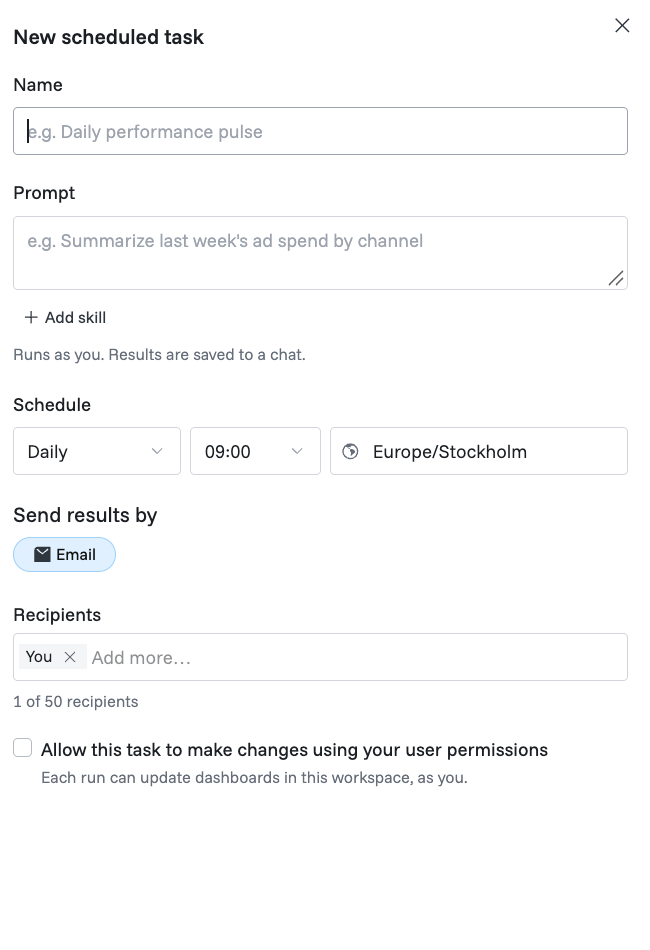
- Open Scheduled tasks in the AI menu and select Create manually.
- Name it, for example "Weekly paid marketing review".
- Select Add skill and choose your saved skill. It is added to the prompt, where you can add anything specific to this run.
- Choose when you want to receive the updates: weekly, a day and time, and a timezone that matches your reporting timezone.
- Choose how to receive the results. They are saved to a Funnel AI chat, and you can also send them by email or, once Funnel AI is connected to Slack, to Slack.
- Select Test run to preview the result, then create the task.
A scheduled run starts a new chat, so keep definitions in the skill or your Instructions, not only in your test chat. Leave the option that lets the task make changes switched off, because the review only reads data. Someone on your team should still review the findings. You can then ask Funnel AI to dig into the changes using your Funnel data, for example by breaking the Oct. 23 conversions down by conversion name. Budget edits, bid changes, paused ads and change history live in each ad platform, so check those there.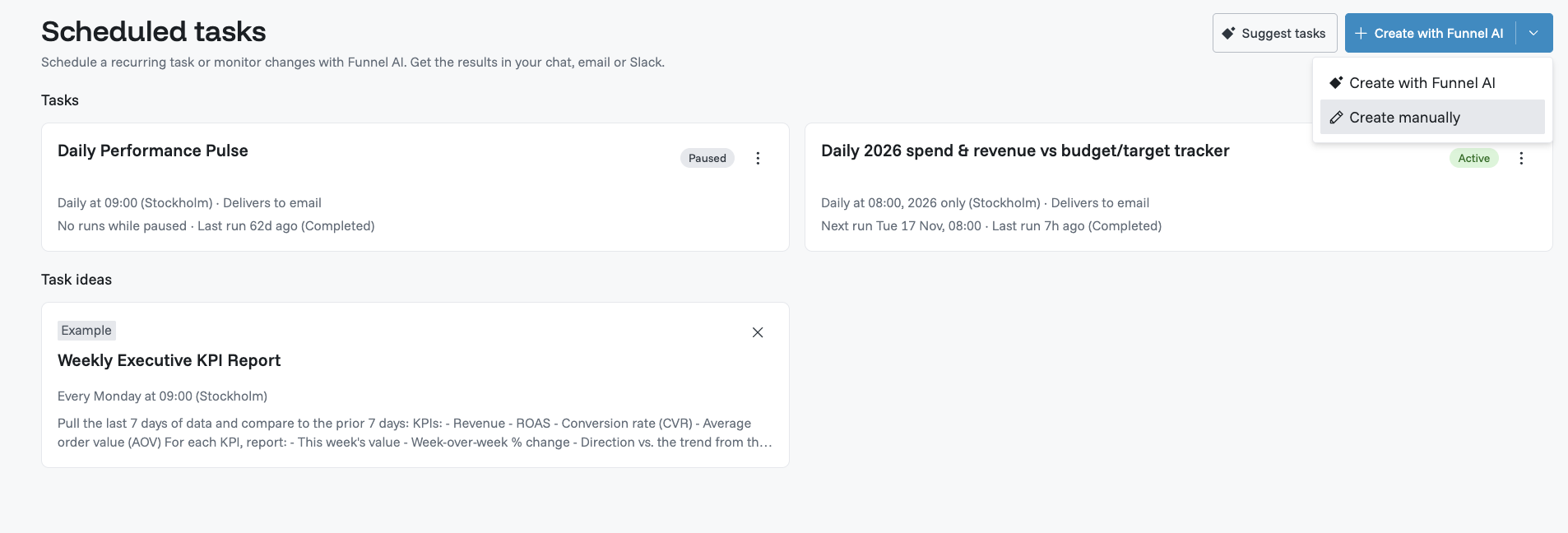
Frequently asked questions
What is the difference between Instructions and skills in Funnel AI?
Instructions are rules the AI follows in every chat. A skill teaches the AI how to do one specific task, and it is used only when a request matches the skill's description or when you ask for it.
What is attribution in digital marketing?
Attribution is how a platform decides which of your marketing channels or ads gets credit for a conversion along the customer journey. Each of the three platforms applies its own attribution settings, so two platforms can claim the same sale. That is why this skill never adds conversions across platforms.
What is a conversion in a Google Ads report?
A conversion is the desired action you have defined as valuable, such as a purchase or sign-up, that Google Ads counts after someone interacts with an ad. Which actions count depends on your account's conversion settings, so confirm the definition before comparing weeks.
What should you check when Google Ads conversions spike?
Start by checking which conversion actions are included in the conversions column, whether their counting settings or tags changed and whether the same event is firing twice. Remember that recent totals can shift as delayed conversions arrive. Then compare the Google Ads report with orders or Google Analytics website traffic and sales data as a cross-check, not an expectation of identical totals, because reporting and attribution differ. A one-day spike, like the 37 attributed conversions in our example, or a cost per conversion that halves overnight, is worth checking before you treat it as real. In search campaigns, keyword performance can also show which terms were behind a spike.
How do you write AI prompts for marketing?
Be specific about the fields, dates and definitions to use, describe your target audience, business goals and marketing strategy, state what the answer should contain and tell the AI what not to do. This skill, for example, says not to guess the outcome metric and to ask one clarification question when a definition is missing.
What are common data quality issues in marketing reports?
Typical issues in digital advertising reporting include missing dates, overlapping data sources for the same account, mixed currencies, zero values that mean missing tracking and performance metrics defined differently across platforms. The steps include checks for these issues, such as comparing overlapping data sources for the same account and asking you to confirm when unsure, before interpreting changes in marketing performance. Read the review's list of checks performed before relying on its conclusions.
Start with your next weekly review. Check the findings and choose the first question worth investigating.