




The best way to get your Adjust data into Data Studio
Centralize your marketing data with Funnel. Then use it to power your dashboards, AI workflows, data warehouse or any other use case you have.
Get a demo






Get Adjust data to Funnel and export the data into Data Studio in 4 simple steps
- Step 1 Log in to your Funnel account 1 min
- Step 2 Connect to Adjust 3 min
- Step 3 Funnel downloads your data 3 - 10 min
- Step 4 Export your data 2 min

Marketers from around the world use Funnel to work with Adjust

Automatically get your data into Data Studio
Fast loading dashboards for monitoring and reporting
Create visually appealing marketing reports and dashboards
Automatically send reports to stakeholders every week or month

Adjust is just one of our many connectors - you can use 600+ others
Funnel uses the Adjust API to get the data you need from Adjust. But if you are a modern marketer, you likely have many data sources. Advertising platforms, social media and your website all generate massive amounts of data. Use Funnel to bring all that data together in one place, automatically.

Robust, reliable connectors, backed by the Data Guarantee

Complete, accurate data for analysis and reporting.

Flexible access management and governed data

ISO 27001 and SOC 2 Type 2 certified, plus GDPR & CCPA compliant
Organize and transform your data in ways that make sense
Funnel allows you to create custom metrics and dimensions. This makes it easy to report on ROAS, ROI, CPL and other calculated metrics.
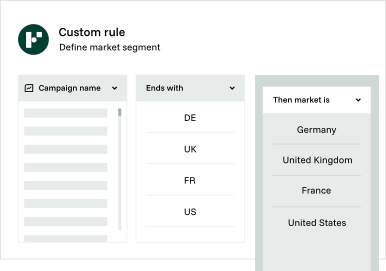
Automate unnecessary work
Automate hours of manual work to clean, group or map data. Save time and avoid errors.
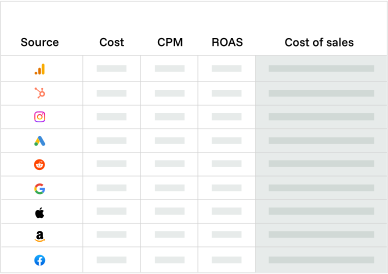
No-code data transformation
Use recommended out of the box rules to normalise data without writing any code.
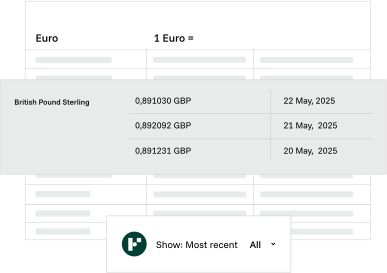
Auto currency conversion
Funnel converts monetary metrics automatically so you can report across markets in a single currency.
Trusted by marketing and data teams worldwide



If I could go back in time and talk to myself before we got Funnel, I'd say: Why haven't you done this yet?


Funnel saves us 8-10 hours per month and has allowed us to eliminate up to 60% of our marketing costs in specific areas.


With Funnel, I can connect a marketing platform, export and analyze the data, and start creating reports within 30 minutes.

Adjust is a mobile analytics platform that provides mobile measurement and analytics solutions for mobile app marketers. The company was founded in 2012 and is based in Berlin, Germany, with additional offices around the world. Adjust's software is designed to help app marketers track and measure their app's performance across a range of metrics, including user acquisition, engagement, retention, and revenue. The platform offers a range of features and tools to help marketers optimize their campaigns and improve their ROI, including fraud prevention, audience segmentation, and attribution modeling.
Marketing professionals can use Adjust to gain insights into their mobile app campaigns by tracking user acquisition, engagement, retention, and revenue across multiple channels and campaigns. Marketers can use this data to optimize their campaigns for maximum impact and ROI. Adjust's platform offers built-in fraud prevention features to help marketers detect and prevent fraudulent activity in their mobile app campaigns. This ensures that campaigns reach real users and maximize their return on investment. The platform also provides audience segmentation capabilities, allowing marketers to target specific user segments based on their behaviors, interests, and demographics. By tailoring their messaging and creative to each segment, marketers can improve their campaign performance and increase engagement and conversion rates.
For more information about how you can use Funnel for Adjust, take a look at the connector page.
Data Studio is the current name for Google's free visualization platform, previously known as Looker Studio. It offers the same great data analytics tools for free to anyone, delivering a lot of data visualization and analysis functionality. Google renamed it back to Data Studio in 2026, ending the Looker Studio experiment and clearing up the confusion with the enterprise Looker BI platform. It is aimed at smaller teams and people who like to work with data visualization in a simple way. Because it is designed for smaller teams, it has fewer of the account management and permission structures you would see in larger, enterprise-focused tools.
Marketing professionals use Data Studio to create custom reports and dashboards that visualize key performance indicators (KPIs) for their advertising campaigns and websites. By connecting Data Studio to their data sources, such as Google Analytics or Google Ads, marketers can evaluate the effectiveness of their ads, identify areas for improvement, and make data-driven decisions based on insights gained.
For more information about how you can use Funnel for Data Studio, take a look at the destination page.
Most popular metrics & dimensions
- Installs
- Cost
- Clicks
- Sessions
- Network Tracker
- Campaign Tracker
- Country
- Ad Group Tracker